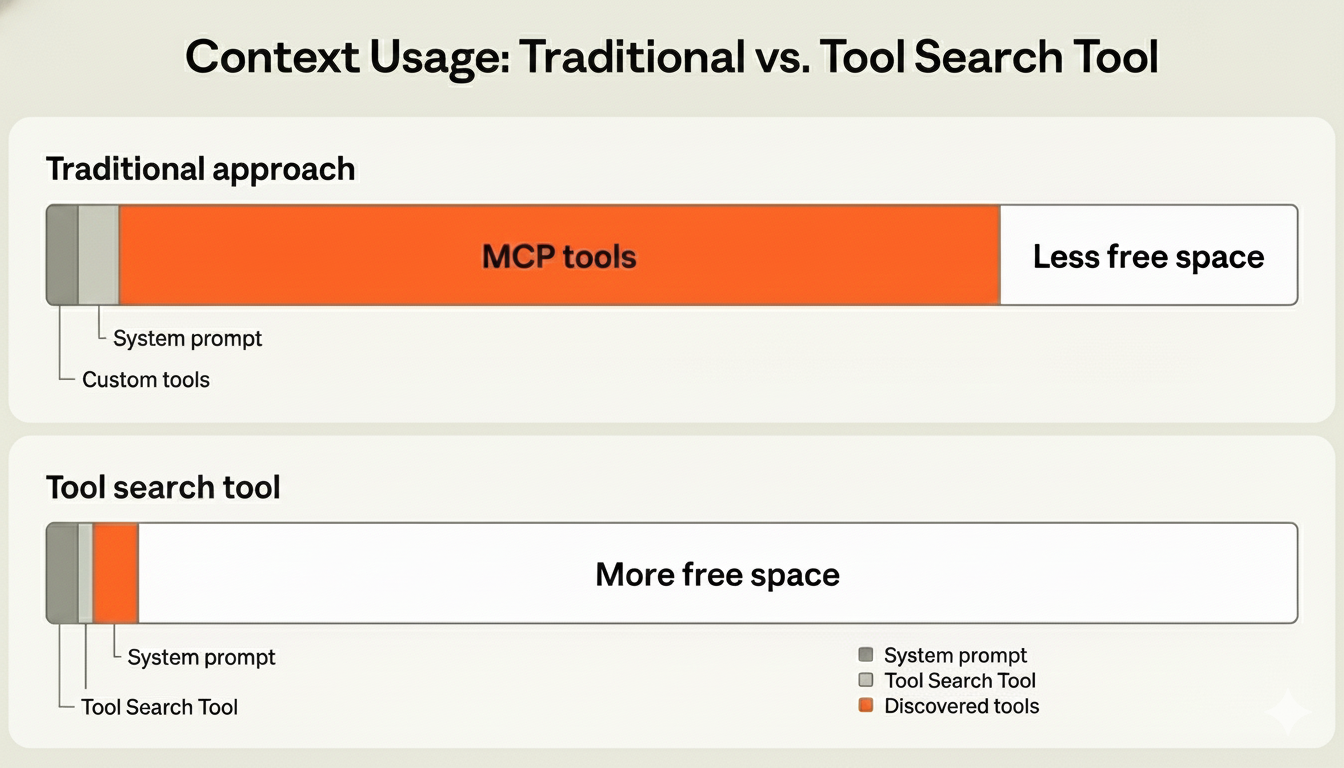
Cut LLM tool context bloat by dynamically filtering relevant tools at runtime using Agentor’s Tool Search API — works with any LLM provider.
LLMs use tools to perform tasks and get information from the world. But when the number of tools is large, the LLM may not be able to use all the tools effectively.Anthropic introduced Tool Search Tool in their blog to reduce
LLM tool context bloat by dynamically filtering LLM tools using tool search.An example of tool context bloat is when the LLM has access to multiple tools such as GitHub tool, Slack tool, Sentry tool, Grafana tool, and Splunk tool.
Just with these 5 tools, the LLM context can easily exceed 50K tokens.
GitHub: 35 tools (~26K tokens)
Slack: 11 tools (~21K tokens)
Sentry: 5 tools (~3K tokens)
Grafana: 5 tools (~3K tokens)
Splunk: 2 tools (~2K tokens)
Meanwhile, Anthropic only shows how to use tool search using their SDK. Agentor provides a more complete solution by allowing you to use tool search with any LLM provider.
Agentor provides a Tool Search API that registers multiple tools and exposes a single tool the LLM saving a large amount of token cost.
The LLM can then use the tool search tool to search for the most relevant tools to use.
In the first step, register all the tools with the ToolSearch API and call the LLM with the tool search tool.We will take an example of a weather agent that can get the weather of a city.
from agentor import ToolSearch, LLM, tool@tooldef get_weather(city: str): """Get the weather of a city""" return f"The weather in {city} is sunny"tool_search = ToolSearch() tool_search.add(get_weather) llm = LLM(model="gpt-5-mini")# First pass: let the LLM call tool_search to discover the best tool.discovery = llm.chat( "What is the weather in London?", instructions="You are a helpful AI Agent. You have access to a Tool search API which can search for capabilities such as weather, news, etc.", tools=[tool_search], call_tools=True, # Execute the tool if tool call is detected)print(discovery)
In the above example, we run the input query What is the weather in London? with tool search tool and it returns
the executed tool output containing the relevant tool for the input.
from agentor import ToolSearch, LLM, tool@tooldef get_weather(city: str): """Get the weather of a city""" return f"The weather in {city} is sunny"tool_search = ToolSearch()tool_search.add(get_weather)llm = LLM(model="gpt-5-mini")# First pass: let the LLM call tool_search to discover the best tool.discovery = llm.chat( "What is the weather in London?", instructions="You are a helpful AI Agent. You have access to a Tool search API which can search for capabilities such as weather, news, etc.", tools=[tool_search], call_tools=True, # Execute the tool if tool call is detected)print(discovery)# Parse the tool_search output and reprompt with only the matched tool.match = Noneif discovery.outputs: tool_output = discovery.outputs[-1].tool_output if isinstance(tool_output, dict) and tool_output.get("type") == "tool_search_output": match = tool_output.get("tool")if match is None: print("[bold red]No tool found by tool_search[/bold red]")else: second_instructions = ( "You already ran tool_search. Use only the provided tools; do not call " "tool_search again." ) result = llm.chat( query, instructions=second_instructions, tools=[match], call_tools=True, ) print("Final result", result)
Last modified on May 5, 2026
Was this page helpful?
Assistant
Responses are generated using AI and may contain mistakes.