
What tracing gives you
A trace is a recording of one agent run. Turn it on and every run shows up in the Celesto dashboard, so you can:- Follow an agent step by step instead of guessing from logs
- See what each tool was given and what it returned
- Find the slow step, and the expensive one
- Tell a failed run from one that quietly ran out of turns
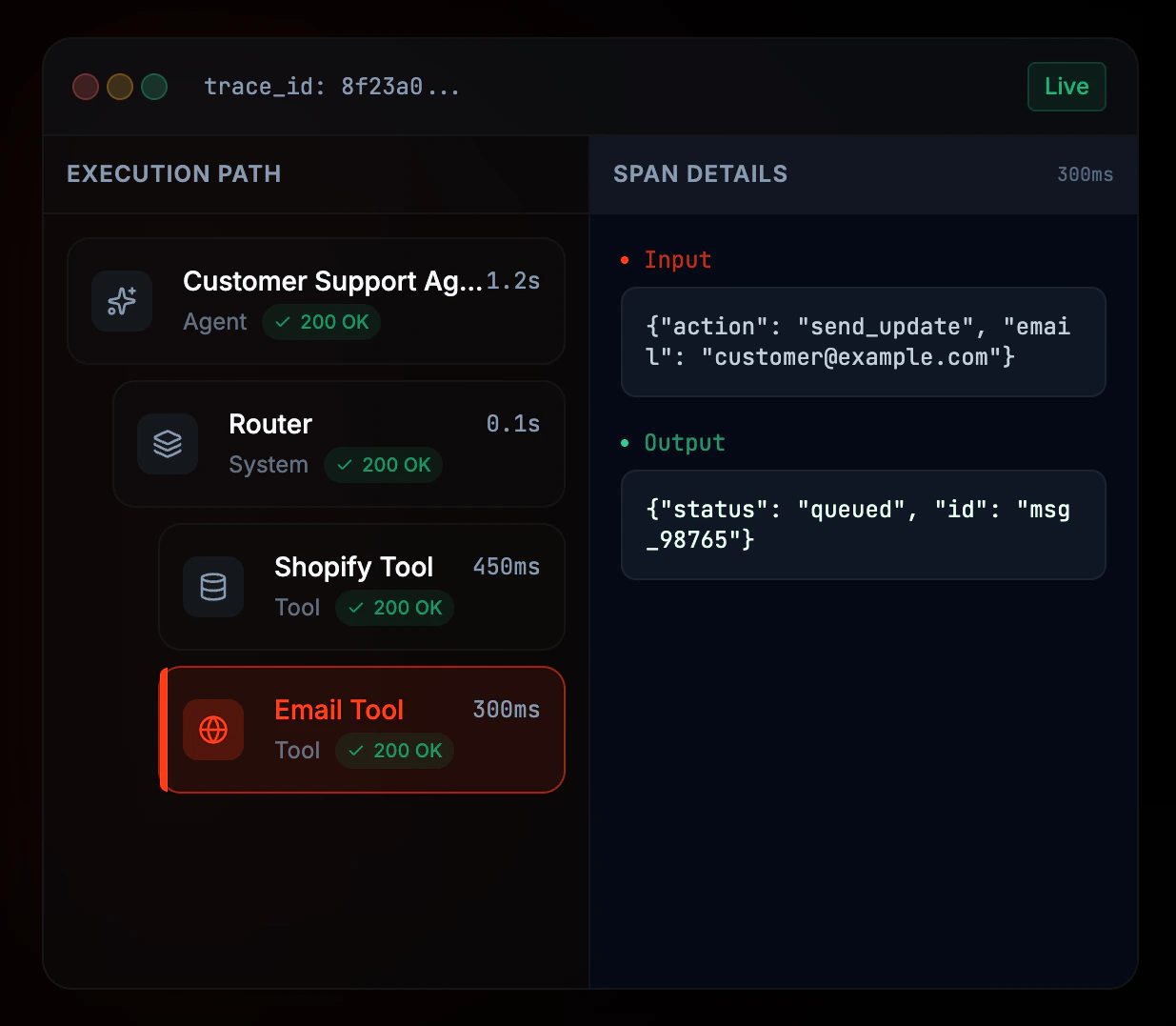
A trace in the Celesto dashboard shows the agent run and tool spans.
Tracing is opt-in. A trace carries prompts, tool arguments, tool results, and the model’s reasoning when a provider returns it, so nothing leaves your process until you ask for it — a Celesto API key alone does not enable it.
Quick setup
1
Set your Celesto API key
Add your Celesto API key to the environment. Get one from the Celesto dashboard.
2
Turn tracing on
Pass Agentor raises with a clear message if
enable_tracing=True when building the agent. Every run it makes is then recorded.enable_tracing=True is set without CELESTO_API_KEY, rather than silently doing nothing.3
Verify
Open celesto.ai/observe and confirm the trace appears.
You should see one trace per run, with a span for each model call and each tool call.
Trace one run
tracing= on the call overrides whatever the agent was built with. Use it to exempt a sensitive input from an otherwise-traced agent, or to record a single call from an agent that normally does not:
None (the default) to keep the agent’s configuration. tracing= is accepted by run, arun, chat, and stream_chat. A per-run tracer is used for that call only — a single tracing=True never enrolls later runs.
What a trace contains
Each run produces one trace and a small tree of spans:
Because a
generation span keeps the request as it was actually sent, you can see the conversation the model saw at every turn — the part that is hardest to reconstruct after the fact.
A run that ends in max_turns or failed is traced with that status rather than dropped, which is usually the run you most wanted to see.
Environment variables
string
required
Authenticates trace uploads to Celesto. Holding the key does not by itself
enable tracing - you also pass
enable_tracing=True or tracing=True.string
default:"https://api.celesto.ai/v1"
Celesto API base URL, for self-hosted or private deployments. Traces are posted to
{CELESTO_BASE_URL}/traces/ingest.Configure the tracer yourself
Build a tracer withsetup_celesto_tracing and pass it to the agent. Use this to send traces somewhere other than the default endpoint, or to hold one tracer across several agents:
str
required
Celesto trace ingest URL.
str
required
Bearer token used to authenticate the upload.
float
default:"10.0"
How long to wait for the upload, in seconds.
tracer= turns tracing on for the agent, so enable_tracing= is not needed alongside it.
A tracer is a plain object, safe to share between agents, and it needs no shutdown or flush call. Each run uploads its own trace when it finishes.
Good to know
Traces upload at the end of a run
Traces upload at the end of a run
Agentor collects a run’s events in memory and posts them once, after the run finishes. There is no background batch worker and nothing to flush before your script exits.
Tracing never breaks a run
Tracing never breaks a run
If the upload fails — network down, wrong token, endpoint unreachable — the failure is logged as a warning and your agent still returns its answer. Turn on
logging.basicConfig(level=logging.WARNING) to see those messages.Abandoning a stream skips the upload
Abandoning a stream skips the upload
If you iterate
stream_chat() and break out early, the run never finishes and its trace is not exported. run() and arun() always drain, so they always export.Group traces by session and attach metadata
Group traces by session and attach metadata
Set Both are optional and default to
trace_group_id and trace_metadata on the agent to tag every trace it produces. Traces sharing a group_id are grouped together in the dashboard, and metadata comes along for filtering and search.None.Security considerations
Troubleshooting
No traces appear in the dashboard
No traces appear in the dashboard
- Confirm
CELESTO_API_KEYis set in the same environment that runs the agent. - Confirm you opted in: tracing is off unless you pass
enable_tracing=True, an explicittracer=, ortracing=Trueon the call. - Check no
tracing=Falseis being passed on the run. - If you use a private deployment, check
CELESTO_BASE_URLpoints at your Celesto API. - Enable warning logs — a failed upload is reported there rather than raised.
A run appears with no tool spans
A run appears with no tool spans
Tool spans come from tool calls. If the model answered without calling anything, there is nothing to show. Check the
generation span to see which tools were offered.Next steps
Durable runs
The same events that make traces can be saved to disk and replayed.
Observability guide
Read token usage and tool history straight off a run result.